Reward yourself today!
Follow the simple steps below to redeem and enjoy your rewards!
Step 1
Download the U.S. Bank Mobile App (text GETAPP to 872265). You can also log in to Online Banking below. Create a username and password if you haven't already.
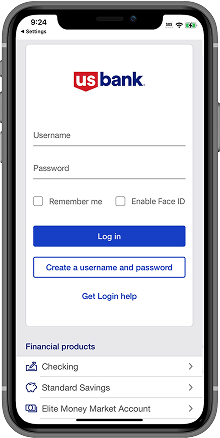
Step 2
Click on “Rewards points” in the mobile app or click on the “View rewards” link on the Account Dashboard in Online Banking.
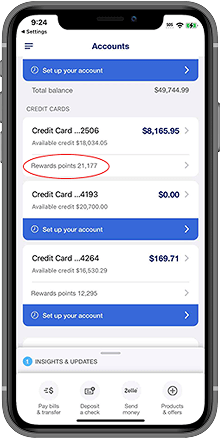
Step 3
Click "Redeem rewards".
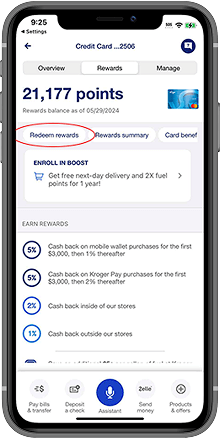
Step 4
Choose how you want to redeem.
1,000 Rewards Points = $10
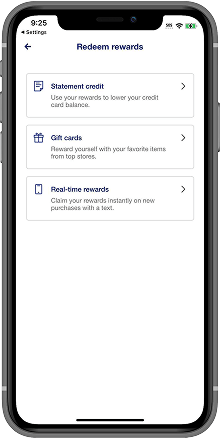
Choose how you want to be rewarded:


Your privacy choices
Opt out of behavioral advertising.

We use tracking technologies, such as cookies, to gather information that helps us understand how visitors interact with our website. We also use this information to deliver advertising on our site and other sites. To opt out of these tracking technologies on our site, select the "Opt out" button.
We use your email address to advertise to you on third-party platforms such as search results and social media sites. To opt out of this behavioral advertising, enter your email address in the "Email address" field and then select the "Opt out" button.
We also honor opt-out preference signals, such as the Global Privacy Control, which communicate your opt-out preferences to the websites you visit.
Please note: You must repeat this opt-out process if you visit our site from a different computer or device, have multiple email addresses or clear cookies on your browser.